
Backups and moving
Settings → Backup (Data → Backup in older versions):
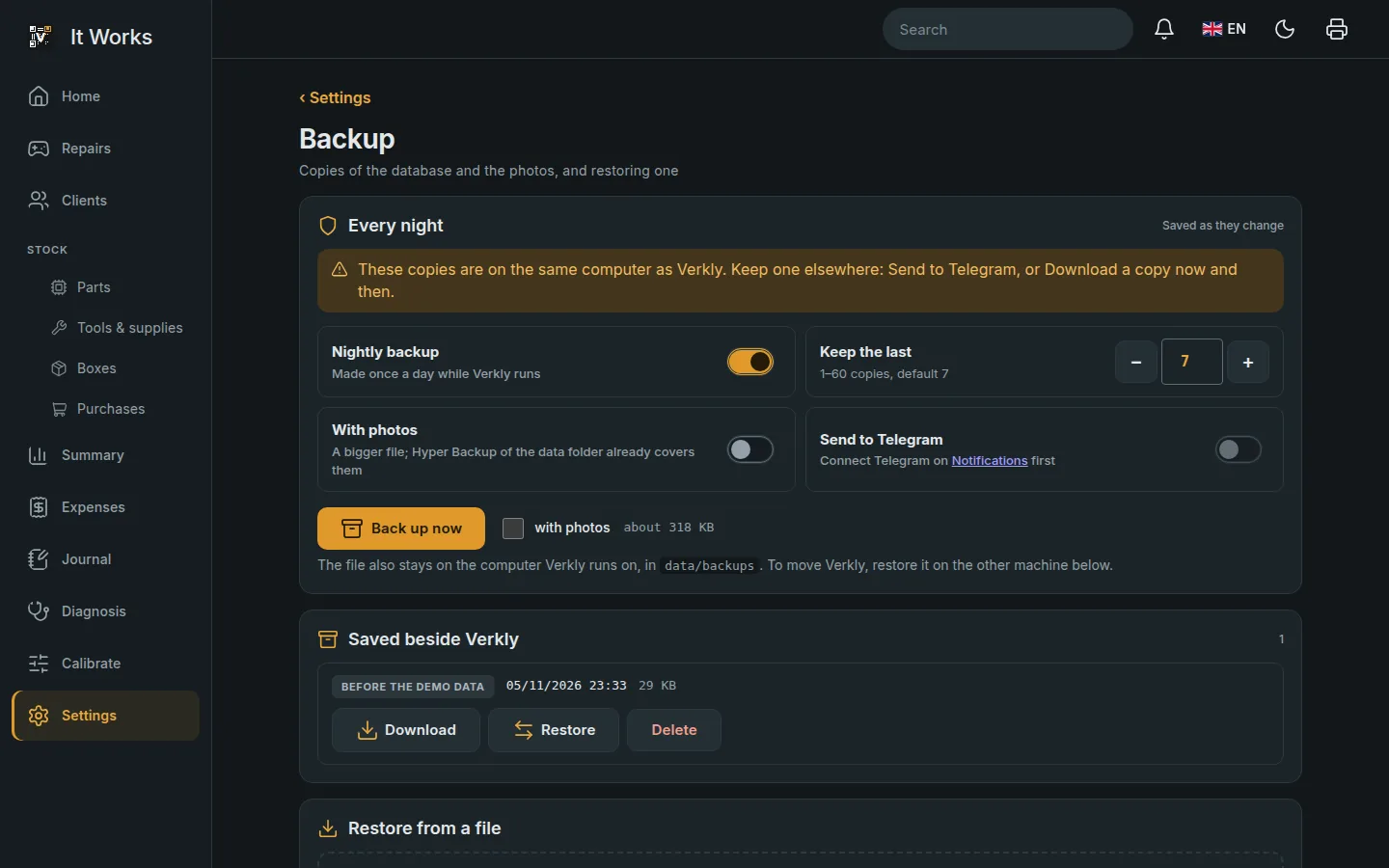
- Back up now: one zip, downloaded straight away. with photos starts unticked, so you get the small database-only copy, and the size to expect (about 12 MB) is shown beside it, worked out from your last copy. Tick it for the zip with every photo and file. Each copy stays in the list with Download, Restore and Delete (a copy an update made says Kept by the update instead of Delete). The times in the list are your own local time.
- Every night a backup is kept (the last 7 by default); on your own server it can also go to your Telegram chat.
- Restore: pick a backup from the list or upload a zip. Verkly checks it first (see below), keeps the current state as "Before a restore", then puts the backup in place and reloads.
The first line of the page says where the copies are: These copies are on the same computer as Verkly. Until a copy has left it, the Settings tile for Backup reads Same disk only in amber. A copy counts as elsewhere when you Download one from the list (for 30 days) or a send to Telegram worked (for 3 days). The download that Back up now starts by itself does not count, because it is made on the same disk; and a failed send to Telegram takes the mark back.
From your own server to hosted, and back
- Download a backup with photos where you are now.
- On the other side, sign in and restore it on Settings → Backup.
- Printed labels keep pointing to the old address: reprint the ones you use, or keep the old address reachable.
A passkey belongs to one address, so add a new one on the new side (Settings → Sign-in & security). Your login, password and authenticator move with the backup.
Keeping a copy elsewhere
The nightly copy lies in the data folder, on the same disk as Verkly: if that disk fails, the copy is lost with it. Keep one somewhere else too:
- Settings → Backup → Send to Telegram: the database goes to your Telegram chat every night (photos stay on the disk).
- Now and then, say once a week: Back up now with with photos ticked, then Download it, or copy
the file from the
backupsfolder inside the data folder to a USB disk, a NAS or a cloud folder. - On a NAS: back up the whole data folder to another disk or the cloud, for example with Synology Hyper Backup.
A hosted workshop is backed up by us every night; downloading one now and then is still a good idea.
Before you restore
After you upload a backup, and also when you press Restore on a copy in the list, Verkly first reads it and shows when it was made, how many devices and parts it holds and whether its photos are in it. Confirm restore stays greyed out until it has finished reading.