
Import and export
Settings → Import and export is a grid of cards, one per list. Each Export gives a CSV file that is also the template of its Import: export, change in a spreadsheet, import back. Owners only.
The lists
- Devices: code, alt_code, kind, category, manufacturer, model, serial, board revision, fault, source, seller, purchase price
and shipping, date, status, link, notes, sale price / platform / date, client name, repair price, paid share, hours, expected
sale price, box, title, colour, sale fee / shipping / packaging. A row with a sale books it with the usual overhead snapshot, its own fee, shipping and packaging (a blank fee takes the platform's percent);
client_namemakes the device a client's (an existing client, or a new one) and keeps aKL-code. The status is one of Verkly's, as the export writes it or as the screen shows it (In repair,Not fixed); a client's device takes the client statuses, and anything else is a row error that names them. The sale price and the money columns are read with your file's decimal mark:169.99in a file with commas between the cells,169,99in one with semicolons. - Parts (the file is
parts.csv): name, category, qty, unit, total, supplier, date, notes, link, description, what it fits (applies_to / make / model / revision), currency, foreign amount and rate, box, package, equivalents, min stock, datasheet, shared. - Expenses (by id): category, description, amount, date, receipt link.
- Clients (by name): name, contact, phone, email, address.
- Boxes: the box, its parent, grid, cell and size, and the furniture columns (Boxes and furniture).
- Purchases: one row per line, the order's columns on the first row of its block, several orders per file (Purchases).
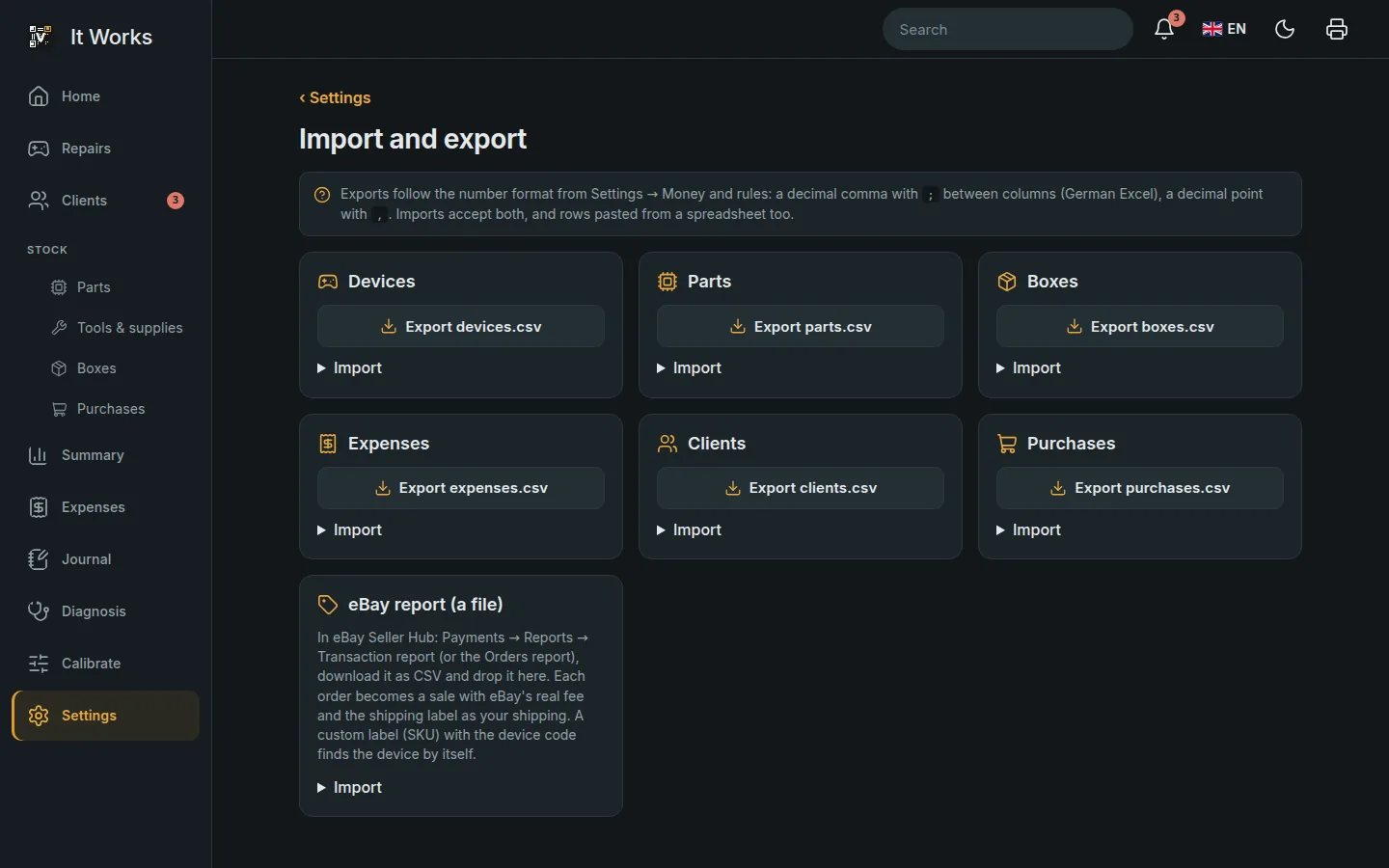
One more card reads eBay report (a file): the Transaction or Orders report from eBay's Seller Hub becomes sales with eBay's
real fees (Selling and marketplaces). Your connected eBay account is a different card, on Settings → Connections.. The expenses list carries the km of a
trip.
Numbers and dates
Exports follow the number format of Settings → Money and rules: a decimal comma with ; between the columns
(what German Excel expects) or a decimal point with ,; UTF-8 with a BOM, so Excel opens it right. Money is a plain
number (15,00), never with a currency sign. Imports accept both formats and tell the decimal mark from the file's own
delimiter. Dates are written as DD/MM/YYYY and read back as that, as ISO (2026-10-23) or as 31.12.2026; an impossible date is a
row error. Rates export with full precision, so a re-import snapshots the same rate.
Preview, then Apply
Upload a file, or Paste text (rows copied straight from a spreadsheet work, they come tab-separated; text whose line breaks were lost on the way arrives as one line, and the preview says so: then upload the file). Preview parses it, says which rows add and which update (by code, or by id for expenses), lists each row's errors with its line, and signs the checked rows. Nothing is written until you Apply; then the card lists what came in, each with its status and a link to its card, and devices offer Open Repairs: All (Repairs from the menu opens on Still open, which leaves out what is sold, donors and repairs handed back); Apply replays exactly what the preview showed, in one transaction: all valid rows together, or none. In the purchase import a bad order reports its errors without blocking the others.
Codes and alt_code
An explicit code in the file is kept, so DS4-007 from your old sheet lands as that very code. alt_code
holds a second printed code, an old label on the device: the search box and a scanned label find both, the card shows it as
Old code. A clash with an existing code or another row's alt_code is a row error, so nothing is ever ambiguous. A box in a
row must exist (its code; a blank clears it); an unknown one is a row error, never created on the fly.
A hand-kept parts sheet
Parts lots reads a spreadsheet as it is: headers like Part / Part number / МАРКА, Equivalent / АНАЛОГ, Package / КОРПУС, Quantity / КОЛИЧЕСТВО, Note / ПРИМЕЧАНИЕ, Price / ЦЕНА and Einheit are understood. A price is optional (blank = €0), a quantity of 0 keeps the part with none left, a new lot is received straight away, and Category for rows without one fills a whole tab with its category. In Google Sheets: File → Download → CSV, one tab at a time.
What round-trips and what doesn't
Everything in the columns above does, including a client repair's price and payments, a device's sale, a lot's currency, a
box's place in its furniture. Not in any CSV: photos and videos, journal entries and their files, diagnoses, reservations,
parcels, tools & supplies and their usage, users and settings. For a whole copy of a workshop, with photos, use a backup
(Backups and moving). A re-import leaves a sold device's fields and sale as they were (its box and
warranty may change), can't take a lot below what is used or reserved, and refuses a sale on a client's device. Spreadsheet
formulas are never imported: a cell that starts like one is exported with a leading ' and read back without it.