
Docs›Settings and administration
Workshop and documents
Settings → Workshop & documents is where your workshop gets its face: the name and logo the app shows, the details on your papers, and every word a client reads.
Name and logo
The Name shows in the app's header and sidebar, on the sign-in screen, in the browser tab and as the name of the Home Screen icon; on the client's page, the receipt, the invoice and in emails. Without one the app says "Verkly". The Logo is a tile beside Change and Remove: picking a file uploads it (any picture, kept as PNG up to 1024 px). It then shows in the header (a phone shows the logo alone), on the sign-in screen, on the client's page and the papers, and becomes the app's icon on a white square.
Picking a logo reloads the page. If you have typed something here that is not saved, the app asks first (Change the logo anyway).
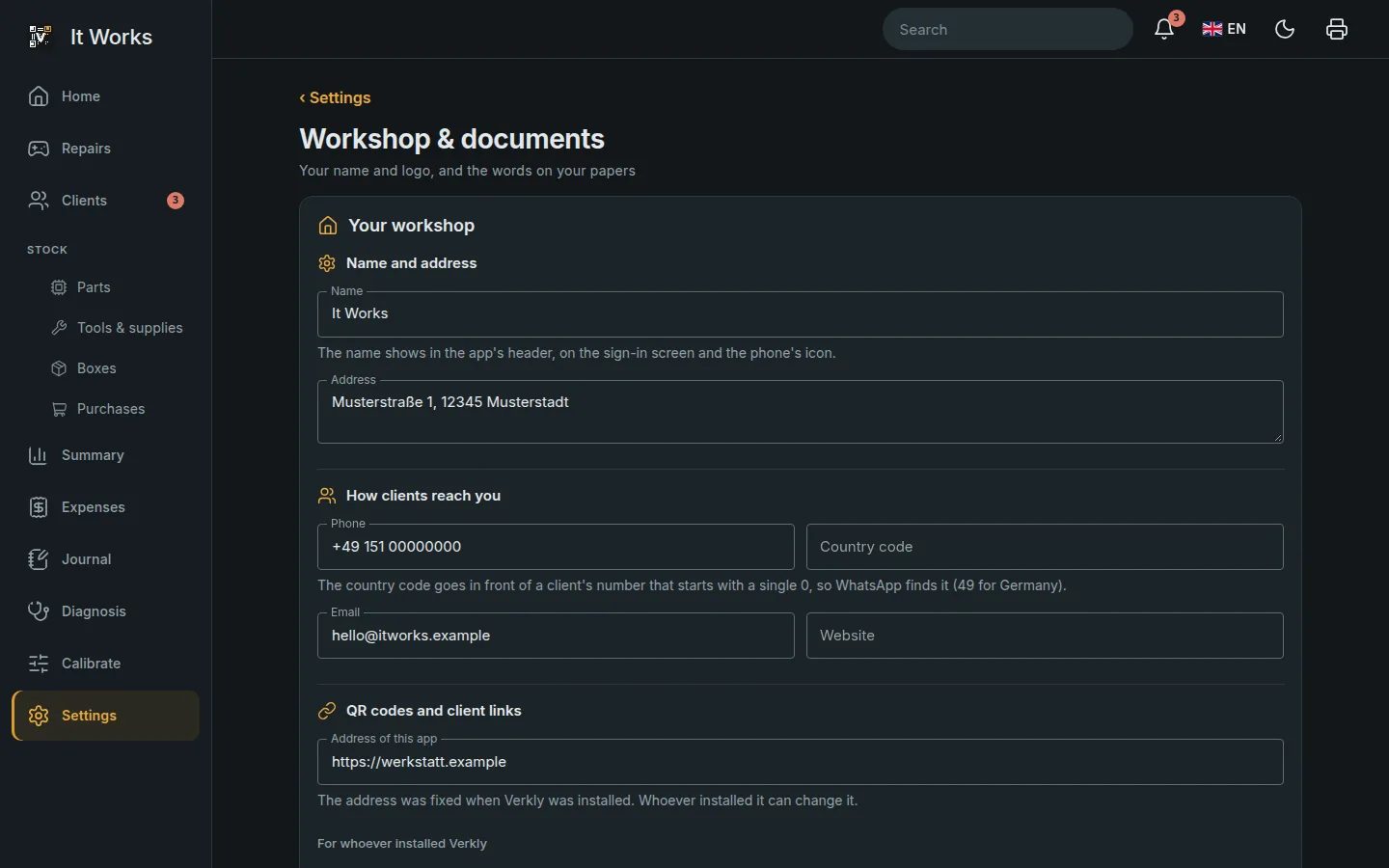
Address and how clients reach you
Address, Phone, Email and Website, each checked when saved. They print on the receipt and invoice, stand beside the updates on the client's page (with Call and Email buttons) and sign off the emails. Your email is also the Reply-To of every message to a client, whichever way mail goes out.
Terms and warranty
Terms on the receipt (what happens with a device not collected, for instance) and a Note on the invoice (no VAT is charged, a small-business clause). Repair warranty, days (90 by default) is stamped on a client's device when it is handed back and shown on the invoice and the client's page; reopening the repair clears it. Warranty on devices you sell, days (0 = none) is stamped at the sale. The date stays editable on the card. Tell the client below picks which statuses email the client or reach them in Telegram (see Talking to clients).
The texts of your papers
Every word on the receipt, the invoice, the client's page and in the two client emails can be rewritten: a tab per paper, each
field with a plain name and where it shows, holding the text in use. Back to the original restores Verkly's wording.
Placeholders are chips you tap to insert: {name} the client, {device}, {code} the repair
number, {url} the link to their page, {price} and {amount}, {shop} and
{contact} yours, {days} the warranty days, {date} the warranty end. A live preview of a
sample repair sits beside the fields: the same receipt and invoice the card prints, the client's page and both emails, so you see
each change at once. An unknown placeholder is left as typed.
Besides the receipt, the invoice, the client's page and the emails, the tabs hold the Messages for WhatsApp, the Repair requests form and its emails, and the Self-made receipt. The client's page tab has the words of the answer block (Approve the price, Decline, Write to the workshop).
Messages, Telegram and repair requests
These have a page of their own in Settings, the tile Clients: request form and messages, with the ways to the texts clients read. Beside your phone, Country code (49 for Germany) goes in front of a client's local number for WhatsApp. A switch offers clients news in Telegram from your bot. The Repair requests section switches on the public request form and shows its link and QR code. All of it: Talking to clients.
Tax on the invoice (experimental)
The group Tax on the invoice (experimental): none, a small-business note (§ 19 UStG) or VAT with its rate, your VAT ID or tax number, IBAN and country, and the e-invoice as XRechnung XML or ZUGFeRD PDF. It changes only the invoice and the file, never the books: Year end and your accountant.
The language of the papers
Receipts, invoices, the client's page and the emails are in one language for all your clients: Settings → Language and this device → Papers and emails to clients, also on this page. Automatic, the default, follows the language your own Verkly is in. Texts you rewrote win over the translation. Your own app, and each technician's, keeps its own language per device.
The app's address
Address of this app at the top of the form is the address Verkly is reached at (https://repairs.example.com).
It goes into every QR code printed on a label and into every client link, and passkeys belong to it too. Verkly learns it from
the first page you open as a signed-in owner; an address like localhost gives way once to the first real one, and Home
offers Use this address when you open the app elsewhere. Fix it before printing labels: a printed QR code keeps the
address it was printed with, and a changed address makes the old labels open nothing. When BASE_URL is set in the
stack the field is read-only and says so: change it there. Details on HTTPS and addresses in
Install on your server.