
Docs›Settings and administration
Settings
Settings (behind More on a phone, in the sidebar on a computer) is a hub of tiles in four groups: Your workshop, Safety, Connections and Help. A tile can carry a status pill, coloured by what it means: green is fine, amber is worth a look (Password only, Same disk only, New version) and red needs fixing (Sign-in off when the address is open to the network, Nightly off, 2 to fix). When something does not work, a red strip at the top leads to What works here. Technicians see only the tiles they may use. Here is the map, in the hub's order.
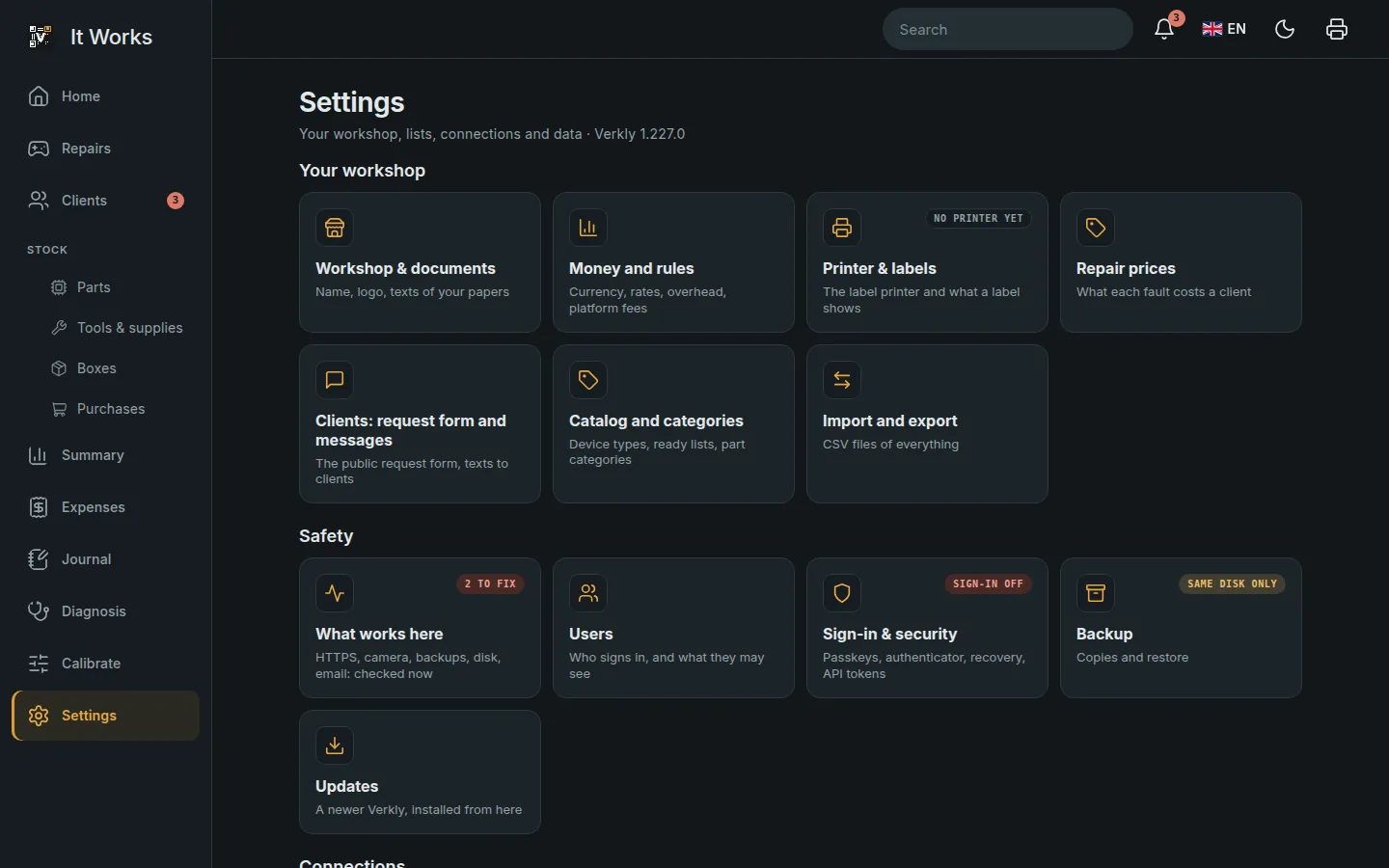
Workshop & documents
Your name and logo, address and contacts, warranty days, the texts of the receipt, invoice, client page and emails, the app's address, tax on the invoice (experimental), repair requests and the client messages. Page: Workshop and documents.
Two more tiles in this group: Repair prices (what each fault costs a client, Diagnosis and prices) and Clients: request form and messages, which opens the repair request form and the texts to clients on the same page.
Money and rules
The home currency and number format (decimal comma or point; they drive labels and CSV), the exchange rates with Add a currency fetching today's rate, the overhead per repair, the platform fees in percent per sales platform, after how many days a device counts as stood still, the rate per km for Trips, your Turnover thresholds and the Accounting export (experimental) accounts (Year end and your accountant). Changing the currency converts nothing, so once money is booked the field is locked. The rules themselves: How money is counted. Exchange rates there are your own and optional: without one Verkly uses the European Central Bank's rate of the purchase day, and a ✕ removes a currency of yours. Next to it, Orders without news sets after how many days an order that is not received shows as waiting too long (21, 0 switches it off).
Not collected sets how many days a repaired device may wait before Home flags it, and holds the switch Remind the client by itself. See A device nobody collects.
In Money and rules a platform with a name and no fee is saved at 0 %. A currency without a rate is refused with “Type a rate for USD or remove it”. Removing a row with its ✕ counts as not saved until you press Save settings, and leaving the page asks first.
Printer & labels
Where labels print (network, Verkly Bridge, USB on the NAS, this device over USB or over Bluetooth for a Supvan / Katasymbol E11), the tape, what goes on the label (QR, barcode, both) and the layout per kind of label with previews. Page: Printing labels.
Catalog and categories
On a wide screen Part categories and Tool & supply categories stand side by side, the Device catalog runs across the full width below them and Share with Verkly comes last.
Part categories: the list your parts are sorted by, renamed in place. Tool & supply categories: the same for tools and supplies (Changing the categories). The Device catalog: category → maker → model → board revision as cards you add to, search and import a list into; the ready lists (phones, tablets, laptops, retro computers, audio) with a diagnosis sheet each; Share with Verkly. Pages: Parts, Diagnosis and prices.
Connections
Parcel tracking: the 17track key (checked before it is saved, only its last four shown; the TRACK17_KEY
variable is the fallback). AI recognition (OpenRouter): your OpenRouter key and the model for chips from a photo. Pages:
Purchases, Parts.
Also here: eBay, your own developer keys for the eBay connector (Selling and marketplaces), and Part look-up, your Mouser, Digi-Key and TME keys (Adding things fast).
Also here: eBay, your eBay account (the keys come first, the values for the developer portal are folded below them; Selling and marketplaces). A report you download from eBay is a different thing: eBay report (a file) on Import and export.
Resend, your own SMTP server or, hosted, Verkly's sender; a test mail. Page: Email.
Notifications
Push to this phone and your own Telegram bot (its token and the chat you link), a test to every channel. Page: Notifications and Telegram.
Users
Who signs in, owners and technicians, one-time links, the reset command for your container. Page: Users and roles.
Sign-in & security
Yours alone: password, passkeys, the authenticator, recovery codes, the recovery email (an owner's), your sessions and sign-out everywhere. For everyone, technicians too. API tokens for everyone too; for the owner also single sign-on and the trusted proxy header. Page: Sign-in, SSO and API.
The password and the authenticator cards say so when sign-in is off, because then no password or code is asked. A password next to a passkey, without the authenticator, shows as Password only: a passkey beside it does not close the password's way in.
Backup
The nightly backup and how many to keep, with or without photos, a copy to Telegram, Back up now, the list of copies with Restore, and Restore from a file. Page: Backups and moving. The tile reads Same disk only in amber until a copy has been downloaded from the list (counts for 30 days) or sent to Telegram (counts for 3 days).
Import and export
CSV of devices, parts, expenses, clients, boxes and purchases, each export the template of its import; pasted spreadsheet rows. Page: Import and export. The Clients card is among them, like the others with its export and a folded import.
Group
Start or join a group of workshops that see which parts each other has, never how many or at what price. Shown when groups are available. Page: Daily work.
Language and this device
The language of this phone or computer (Automatic follows the browser) and, for an owner, the language of the papers and emails to clients; Show the page tips again; and for an owner Help improve Verkly: the usage counts with the exact list of what travels, off by default on your own server (Questions).
Where a screen has a technical setting, such as the app's address or a key from the install, it sits in a fold For whoever installed Verkly, so the text you read has no setting names in it.
What works here
What works here checks this install and the browser it is opened in, all at once. Each line is green, amber or red, says what it means and has How to fix next to it when something is wrong:
- This browser: HTTPS (without it a phone blocks the camera scanner, passkeys and printing over Bluetooth or USB), whether the page is open at Verkly's own address, the camera, Bluetooth and USB, and whether the clocks agree.
- This install: Verkly's address (one that opens only on this computer, plain HTTP or one that works only inside your network), whether it opens from the internet, Tailscale (HTTPS, Funnel, when its key runs out), sign-in, backups, free disk space, email, the label printer, Telegram and the version.
Open the page on your phone too: the browser part is about the device it is opened on.
Home shows a red line when Verkly doesn't open from outside. On the computer, docker exec verkly python -m app.doctor runs the same check in the terminal.
What does not work, or is worth a look, comes first, under To look at first (red before amber); the rows that are fine follow. The tile has its own icon and, when something is red, a count such as 2 to fix. The count leaves out the address row while Verkly is open on this computer only (localhost), as on a home install.
Updates
The version that runs here, the newest one out, and Update to …, which installs it in a minute or two with a copy of the database first. Install new versions at night does it by itself. An install without the updater sees how to add it: see Updating from the browser. A hosted workshop has no such tile: the hosting updates it.
What's new
The running version and every release's notes.
Plan & billing
Hosted workshops only: the plan, the trial, storage used and the billing page. See Hosted workshop.
Feedback
A problem or an idea, with an optional screenshot, sent straight to us; the page lists exactly what goes with it (the version, the page you came from, the browser) and nothing from your data.