
Purchases
Stock → Purchases. A purchase is one listing or one order: an eBay lot of four controllers, an AliExpress cart, several items paid together. It creates the devices, parts, tools and supplies that were in it and gives each its share of what you paid.
The list has its own search (shop, seller, order number, what was in it) and sorts by order date (Newest first, Oldest first) or by cost (Most expensive, Cheapest); each order has its Order ↗ link beside it. The sort you pick stays after a reload (it is kept on this device).
The view Delivered, not received lists the orders whose parcels have all arrived but that you have not marked received; the Home tile of that name opens it. The list shows how many parcels have arrived without cutting the number off, and the Stock tabs scroll to the one you are on.
An order that is not received and has had no news for 21 days (the day it was ordered, or the last change of its parcels, or a parcel added) shows on Home as orders without news for a long time, as the chip Waiting too long on this list with a N days without news mark on each, and as an amber line on its card: Ordered 24 days ago, no news since. Add a tracking number, or mark it received if it is here. with Mark received and Add a tracking number. An order whose parcels are all delivered already has its own line on Home, and an order refunded in full is left out. The 21 days are yours to change under Settings → Money and rules → Orders without news (0 switches it off).
In New purchase pick On its way or Already here at the top; for a parcel that is here, give the Received on day. Add the shop's Order number (optional): if you already have that order, Verkly names the purchase. The price of a line reads Listed price for the whole line with a live sum like 2 × 15,75 = 31,50, and on a one-line purchase it starts as what you paid. The optional fields of a line (description, what it fits, link, photo) are folded under More about this line. Import from a file on the Purchases list and Import a file (CSV) in New purchase open Settings → Import and export on the purchases card; its help names the real columns and says one file can hold several orders. The card shows Inspection and Parcels only when they apply.
One sum, split to the cent
You type what the shop charged (with shipping, tax and coupons) and any refunds; the lines carry the listed price of each item. Verkly splits the charge over the lines in proportion to those prices and evenly over the devices of a line; the cents always add up. The shares become the devices' purchase price and the lots' total, so the money rules apply unchanged. A live preview shows the split while you type.
A foreign-currency order carries the listing's amount and the rate (€ per unit): typed, or taken from the rates on Settings → Money and rules, where Add a currency fetches today's ECB rate (offline, type one). The rate is kept with the order, so a later change of the rate never moves an old order. The rate field fills in by itself with the European Central Bank's rate of the purchase day when you give none and the settings have none.
Lines
- Devices line: a device type, how many, the listed price, optionally a device name written onto every device it creates (a hundred identical DualSenses, told apart later on their cards) and the catalog's category, maker, model and revision.
- Parts line: the part's name and category, quantity and unit, what it fits (category, maker, model, revisions), a description. Its Type can be Part, Tool or Supply: a tool or supply becomes a Tools & supplies item instead of a lot.
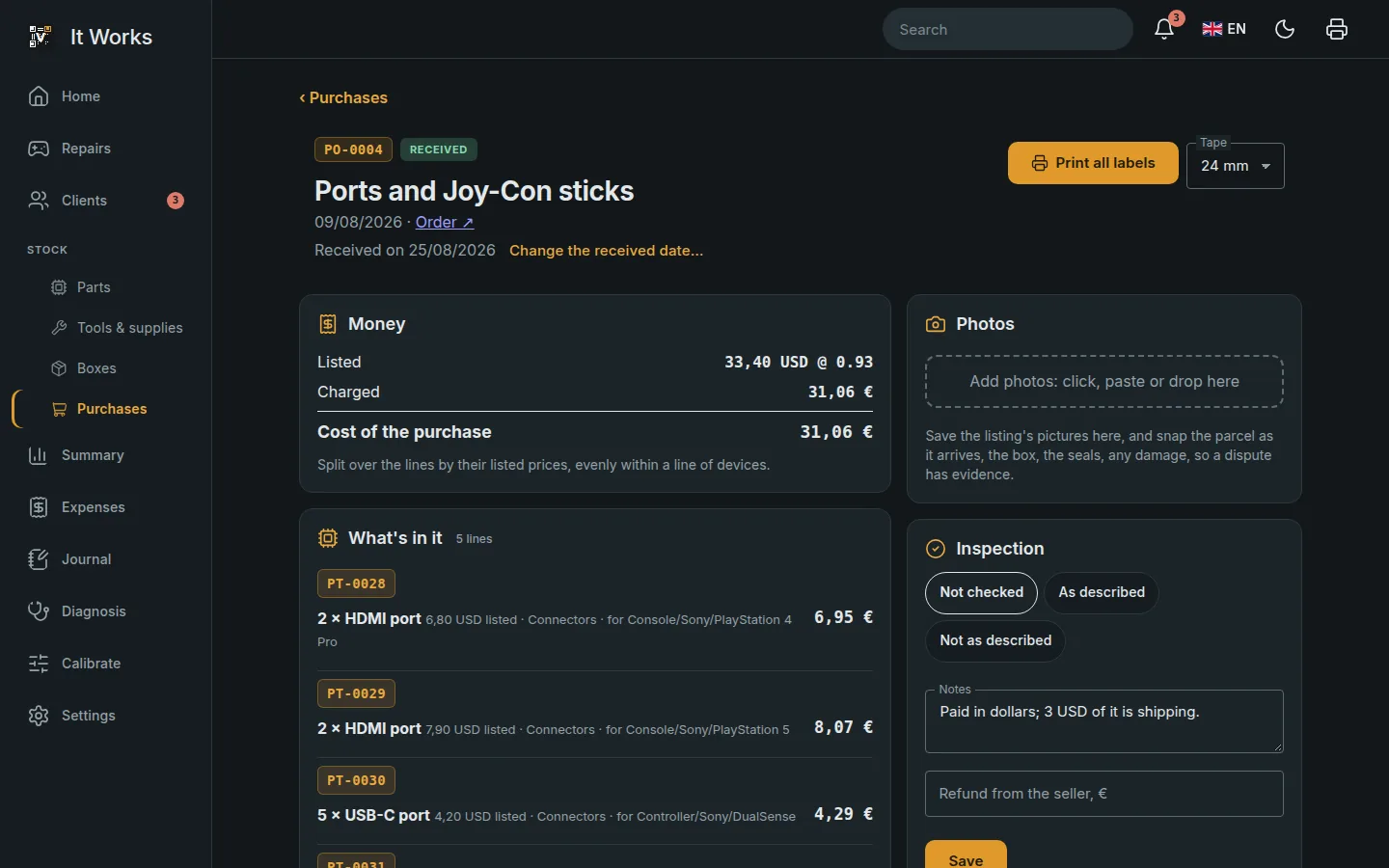
- Each line may carry its own link (a cart mixes listings) and a picture: a link the server downloads after the order is saved, or files you queue on the form. A long title becomes the lot's description and a short name goes on the label.
Every line's thing links back to its purchase, and the purchase card lists them with thumbnails. The Order ↗ link opens the order: the purchase's own link, or for an AliExpress order with its number, the order page built from it.
Packs
A listing of two tubes of glue is one line, but you want two things on the shelf. A parts line (Part, Tool or Supply) has Packs beside Quantity and Counted in: the quantity is what is in one pack, so 10 ml and 2 packs make two supplies of 10 ml, each with its own code and label. The line's share is split evenly between them, like the devices of a devices line, and the preview shows what each costs. The card reads 2 × 10 ml UV glue.
Kits on a purchase line
A parts line's Type can be Kit: a sample book or an assortment, one part per value. The line then lists the values instead of one quantity, with the same Paste a table, Read it with AI and Where it goes as Add a kit on Parts. The line's share of the order is split evenly per piece over its values, and the preview shows what a piece costs. The card shows the line as Kit · 50 values · 2500 pcs with its box and its parts folded underneath; they arrive when the purchase is marked received, like any other lot.
From a shop link
On New purchase, From a shop link reads the page and fills the order and one line; you type what you paid. When a shop refuses (AliExpress often does), the link and the shop stay filled in.
For a big order with many listings, every line has Fill this line from the link: paste that line's listing link and it reads the page for that line only, leaving the rest of the order alone. Or open Several links for one order under the shop-link box, paste one link per line (up to 20) and press Add a line for each link: each link becomes a line, and a page that can't be read still gets its line with the link kept. You type the prices you paid.
Parcels and 17track
A purchase without Mark received is in transit: its devices show as in transit and its lots can't be used yet. Add any number of parcel numbers under Parcels. With a 17track key (Settings → Connections → Parcel tracking; registering a number spends 17track's quota once, reading doesn't) Verkly registers the number and reads its status; without one the row has a Track link. 17track can't tell every carrier from the number (Hermes Germany is 14 bare digits), so pick the Carrier on the row or leave it on Detect automatically. A freshly registered number is empty for a minute or two while 17track collects the data: the row says so and Verkly reads again by itself after 90 seconds and 5 minutes, then every hour for undelivered parcels of orders not yet received. Refresh rereads now. A 17track hiccup never blocks you: it lands on the row with "Press Refresh".
A parcel reaching out for delivery, ready for pickup or delivered sends one notification to your phone and Telegram (Notifications). When all parcels are delivered the card offers Mark received; nothing is received automatically, because delivered isn't "in my hands".
Mark received
Press it when the parcel is open on the bench: the devices become bought, the lots can be used, and a part a diagnosis marked as ordered from this purchase is reserved for its device and you are told. The real arrival day can be set; a received purchase offers Print all labels with the tape on top.
On the purchase card, a tap on Not checked, As described or Not as described saves the inspection at once, and the notes you have typed stay. Save is for the notes and the refund.
Mark received asks Received on and starts with today; pick the real day if the parcel came earlier. A wrong day is fixed with Change the received date… on the purchase card: the costs stay in the month of the order. The day can't move past the first time something of the purchase was used, counted or sold, nor across a New Year while the earlier year is closed.
Marked received by mistake? Not here yet after all… in Purchase details puts the purchase back on its way. It works only while nothing of it has been used, sold, put in a box or on a shelf plan, counted, reserved, or picked in a project or a build; otherwise Verkly says what it found and changes nothing. Messages already sent are not taken back. Both are the owner's.
Put away
Right after Mark received a Put away window opens (a sheet from the bottom on a phone). It lists everything the purchase made, the parts, tools, supplies and devices of every line, each with its code, name, how many came, its picture and the box it lies in now. Give each row a box from the same tree as everywhere else, or pick one under All into one box to fill every row. On a phone Scan a box label reads a box's code with the camera (for every row, or the row whose own scan button you tap), and New box… makes a box right there, with a name and where it stands, and puts everything in it. A row you leave as it was stays where it is; the button says how many changes it will save, all in one go.
After saving, the window offers Print labels for everything that came, with the copies and the size as on the lists, or On paper, or Done. Later closes it without changing anything, so receiving is never held up. While something from the purchase has no box, its card shows a Put away section with how many things are without a box, and opens the same window; the count is the one Home shows under things without a box. A technician can put things away too, without seeing any money.
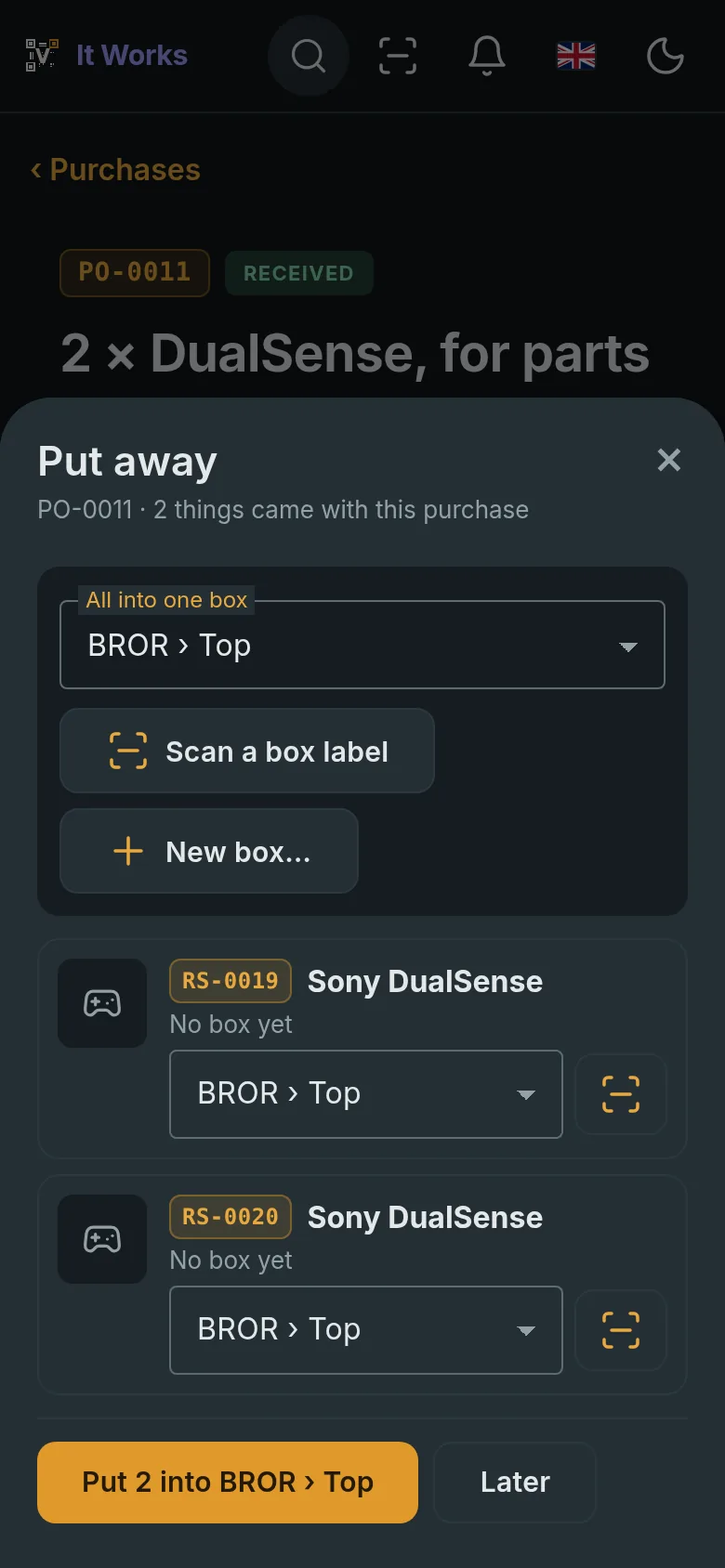
If you close the window with boxes picked and not saved (Later, ×, Esc), Verkly asks Leave without saving?. With nothing picked, the button says Next: labels. The labels step prints only for the things that need a box, not for what is sold or used up.
What can change later
The charge, refunds and line prices can change while no device of the purchase is sold (a sold tool counts too); then the shares are recomputed. Once something is sold the split is frozen and the card says so. A link, a title, a description, notes, photos of the parcel and the listing can always be added. Deleting a purchase deletes what it created; a purchase made by grouping is undone with Ungroup instead, while nothing is received.
Edit the lines of a saved purchase
You entered an order with a mistake: Edit the lines on its card changes prices, quantities, types, packs, names and the amount or rate, while nothing from it has been used. The money is split again over all lines to the cent. The things you keep keep their codes and labels. A line you leave out is removed with its parts or devices, a new line makes new ones, and a kit keeps its values (only its price moves). If something was used, sold, reserved, counted or picked by a project, the card says what and why it is fixed; a box or a label never locks it. An order from a closed year can still get new names and links, but not new money, so a year paper you handed in does not move.
Grouping tools into a purchase
Tools and supplies bought by hand can be grouped into one order afterwards: on Tools & supplies, Select, tick them, Group into purchase. The order is in transit, charged the sum of their amounts, one line per item; the month a supply's cost lands in doesn't move. An item already in a purchase or already used can't be grouped.
The purchase CSV
Settings → Import and export → Purchases: one sheet holds several orders. An order column groups the
rows (the export writes the purchase code there); without it a new order starts at the next non-blank source. The order's
own columns (source, seller, link, ordered_at, currency, charged, foreign_amount, exchange_rate, refund, received,
order_title, received_at) are read from the first row of its block; every row is a line (kind, title, category,
manufacturer, model, board_revision, qty, unit, packs, price, mode, item_kind, kit, device_title, line_link). A kit line carries its values in kit as 100nF [0603] × 50 | 1uF × 25 (not its box). The import also takes
external_ref, the applies_* columns and photo_url. Preview shows
each order with its split and errors; Apply creates every valid order in one go.
Re-import protection: the marketplace's own order number (external_ref, or an order value that
looks like one) is unique per shop. An order already imported shows greyed as "already imported" with its code and is skipped; a
second copy of the same number in one sheet is an error. Pictures are only links in the CSV; they are downloaded after the
import. A dead link is listed under the order and never blocks it.