
How money is counted
| What | How |
|---|---|
| A part's unit cost | The lot's total with shipping ÷ how many. Frozen when the part is used, so revaluing a lot later never changes a repair already sold. |
| A device's cost | What you paid for it + its shipping + every part used, each at its unit cost. |
| A purchase's split | What was charged minus refunds, split over its lines by their listed prices, evenly over the devices of a line; the cents add up. |
| Margin | Sale price − platform fee − shipping to the buyer − packaging − overhead − the device's cost. |
| Overhead | A fixed amount per repair from Settings → Money and rules, kept with each sale. Changing it later doesn't touch past sales. |
| A donor | Harvested parts go back to stock at a value you estimate, taken off the donor; what is left is written off. A donor sold later margins against what is left. |
| Monthly net | Margins + overhead collected + other income − general expenses − donors written off. |
| Tools | An investment, not a monthly cost: Summary shows how much of it the workshop has earned back. A tool sold gives its proceeds back to the tools. |
| Supplies | A cost of the month they were bought. |
| Client repairs | Kept apart: what the client paid − the parts used − overhead. |
Other income
Money that came in without a device or a tool sold or a client's repair paid, for example a small soldering job or advice, goes on Expenses → Income (the switch on top of the page). Add asks the Category (Services, Other, or + New category…), the Amount, What for and the Date. Summary adds it to the month's net (an Other income column in By month) and to Came in in Money of the month; the year paper and the accountant's files list it as other income. A device or a tool you sell is still recorded on its card, a client's payment on the client.
Spent on purchases
A device you bought is not an expense: its price waits in the device's cost (Summary's In repairs now) until it is sold, where it lowers the margin, or written off as a donor. To see the money that went out anyway, Summary has Spent on purchases: per month, what you paid for devices, parts, tools and supplies, by the day they were bought. It is only shown, never taken off the month's net.
Money of the month
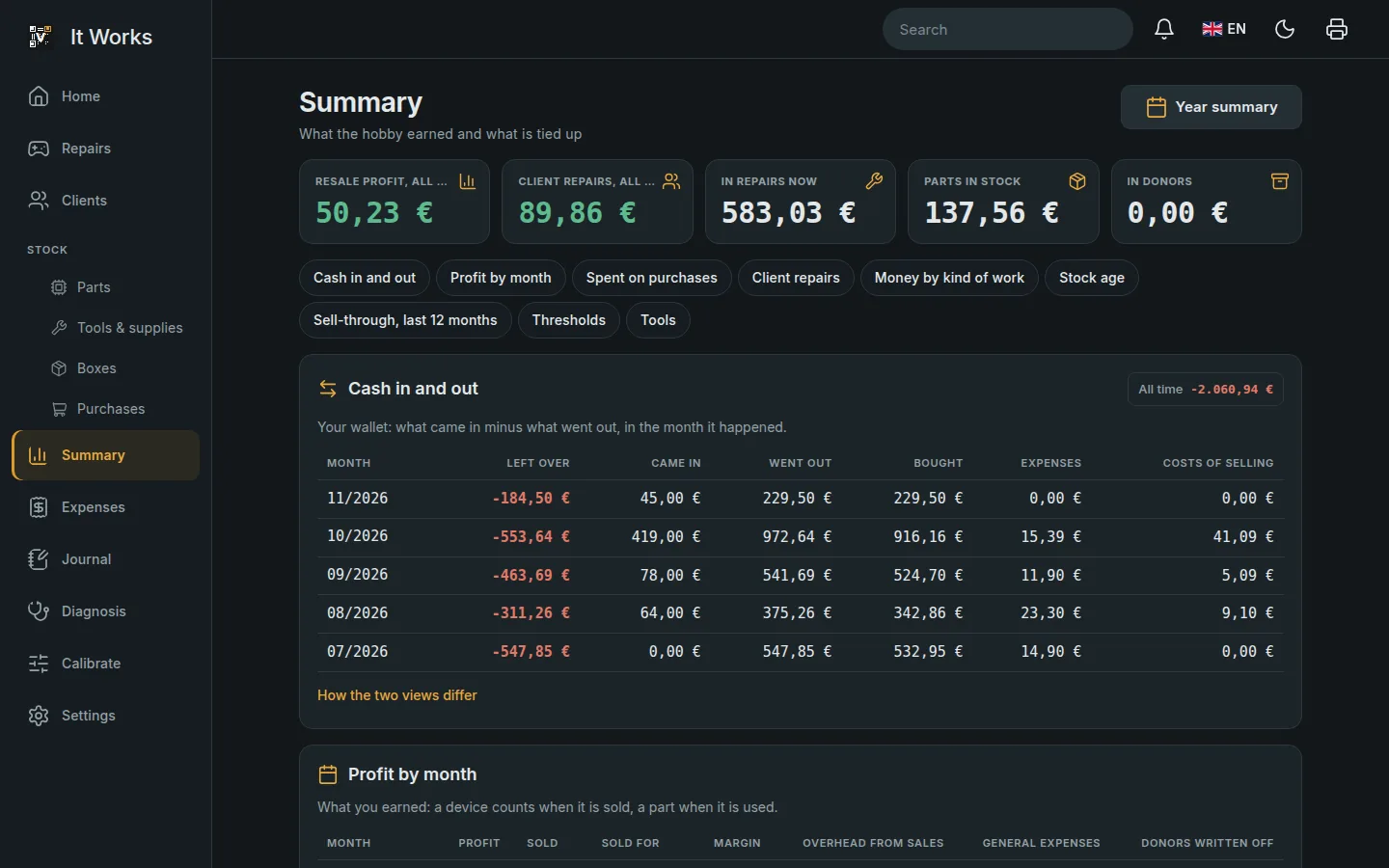
Summary's Money of the month is your wallet: per month, what Came in (devices and tools sold, at their price, and client payments) and what Went out (everything Bought, the Expenses, and the Costs of selling: each sale's fee, shipping and packaging), by the day it happened. Left over is the difference. A device you buy lowers its month here at once, whether or not it can be repaired.
By month is the profit: a device's price counts in the month it is sold, inside its margin, or when you write it off as a donor; a part counts when it is used. Until then that money sits in In repairs now and Parts in stock. So a month where you bought a lot and sold little is red in Money of the month and may still be green in By month. Over a long time the two meet; month by month they differ by what you bought and haven't sold yet. How the two views differ under the table says the same. Nothing is booked twice: Money of the month is only shown.
Verkly computes no tax. The year on one paper, trips, the accountant's files and the experimental tax on the invoice: Year end and your accountant.
The two views on Summary are called Cash in and out and Profit by month, each with a line saying what it counts. The first tile is Resale profit, all time and Client repairs, all time stands beside it; the bold column in both tables is Profit.
Warranty on Summary
Once a repair has come back under warranty, Summary has a Warranty block: how many came back each month, what the parts used on them cost (Parts cost) and how many of the repairs you handed back came back, in per cent. A repair that comes back twice counts once. A warranty return has no price and no payment, so its parts are already in the month's client net: the block only shows how much of it is warranty. See Back under warranty.
Summary has chips at the top that jump to each section. Client repairs comes before Money by kind of work.
Money by kind of work
Summary has Money by kind of work: what each kind of work brought in a period. A kind of work is the name of a service line on a client's repair (Services), like Stick replacement; the same name in any case or spacing is one kind. Pick This month, Last month, This year or All time, or type a day in Period from and Period to (both days count). For each kind the table shows Times (how many were done), Repairs, Billed (the price of the lines), Paid and Share of all that was paid. The biggest comes first.
A repair counts the day it was paid, like Client repairs on the same page, so the paid total equals the labour income of those days. What a repair was paid is spread over its lines in proportion to their prices; with a part payment each line gets its part, and the cents always add up. A repair with one price and no lines is the row Repairs with one price, no lines, so the table adds up to everything paid. A repair nobody has paid yet is not in it. Nothing is booked: the table only reads.
If Money by kind of work can't load, it says so and offers Try again.